Optimizely SaaS CMS Webhooks: "The URL provided could not be validated. Please check the link and try again."
Sep 30, 2026
 If you've just hit that error trying to save a webhook in Optimizely SaaS CMS, here's the short version:
Optimizely SaaS CMS performs a validation handshake before it will save your webhook. It sends an HTTP
OPTIONSrequest to your endpoint URL, and your endpoint must reply with the headerWebHook-Allowed-Origin: *. A200 OKon its own is not enough. Most free webhook-inspection tools return200but do not send that header, so the CMS refuses to save the webhook. Configure your test endpoint to returnWebHook-Allowed-Origin: *onOPTIONS— in Beeceptor this is a single mocking rule — and the webhook saves immediately.
That's the answer. The rest of this post explains why and walks through a Beeceptor setup step by step:
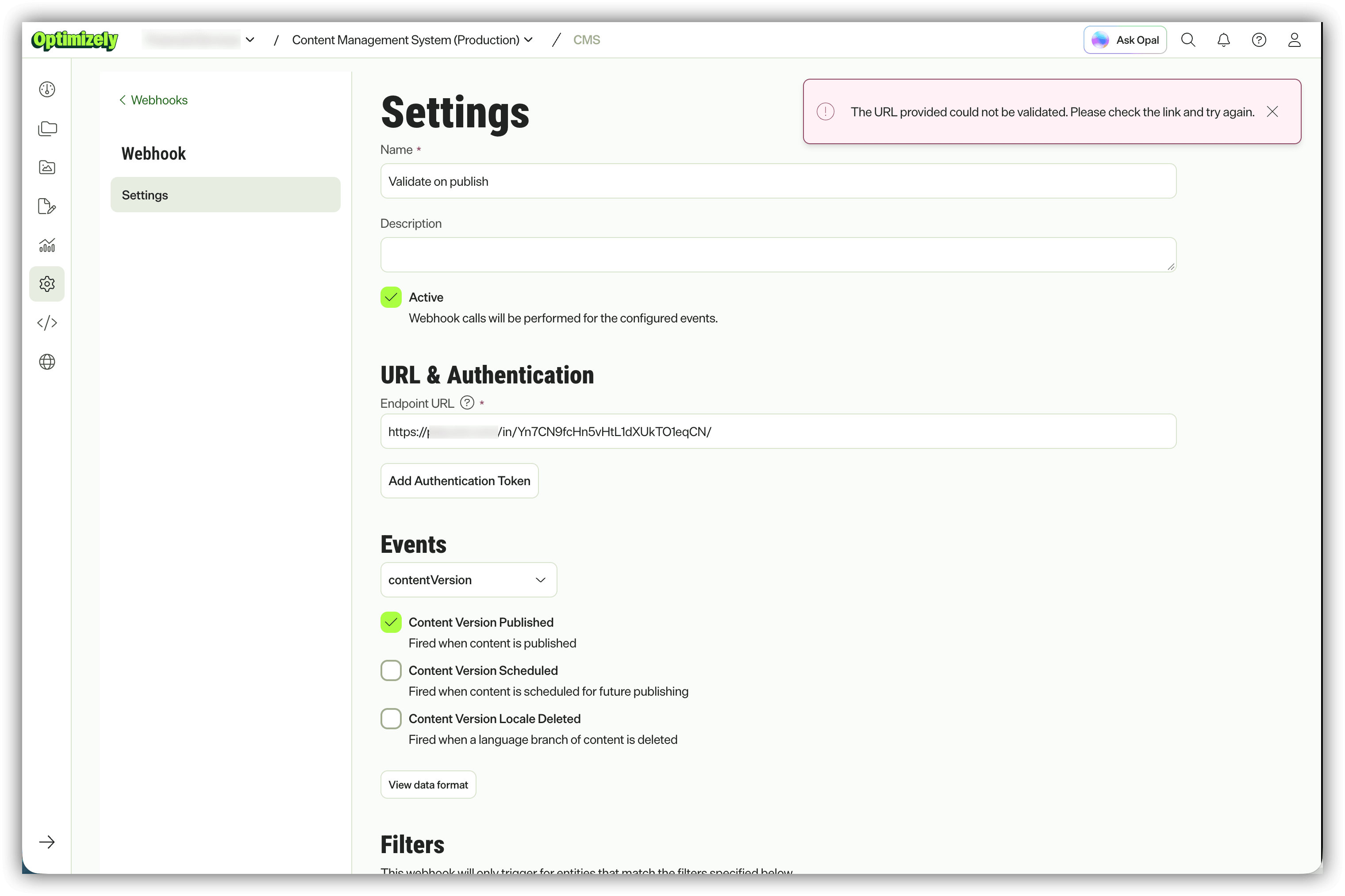
The error you're probably here for. Note the endpoint URL is perfectly valid and reachable - that's not what the CMS is complaining about.
The workflow that got me here
A typical developer workflow with webhooks looks like this: hook something up, fire an event, inspect the payload, see what's actually in it, and then design your integration around the real shape of the data rather than what you assumed it would be. The usual way to do that is to point the webhook at one of the free webhook-inspection services, publish something, and read the request off a dashboard.
Optimizely SaaS CMS recently shipped webhooks as a first-class, built-in capability. In practical terms that means you can configure a webhook directly in the CMS UI - no code, no scheduled job, no polling Optimizely Graph on a timer - and use it to trigger downstream work. In my case I was using CMS webhooks to kick off an agentic workflow in the Optimizely Agent Platform when content is published.
The CMS UI gives you:
|
Field |
What it does |
|---|---|
|
Name / Description |
Labels for the webhook list |
|
Active |
Toggle delivery on/off without deleting the webhook |
|
Endpoint URL |
Where the |
|
Add Authentication Token |
Sent as |
|
Events |
One category per webhook - e.g. |
|
Filters |
Restrict delivery to events matching specific data fields |
All good so far. Then I pasted in my throwaway inspection URL, clicked Create, and got told the URL could not be validated.
Why the CMS rejects a perfectly good URL
The endpoint was live. It was HTTPS. It returned 200. Pasting it into a browser worked. So what's the CMS actually checking?
Optimizely's documentation describes this as a verification message: the CMS "confirms that you control an endpoint before it sends events to it." A newly created webhook sits in Pending status until the endpoint confirms that message, at which point it flips to Active. The docs are explicit that verification is tied to the URL - change the URL later and you re-verify from scratch.
What the docs don't currently spell out is the wire-level mechanic, and that's the bit that bites you. The behaviour matches the CloudEvents HTTP Webhook abuse-protection handshake, which works like this:
-
The sender (Optimizely) issues an
OPTIONSrequest to the exact endpoint URI, including aWebHook-Request-Originheader identifying itself, and optionally aWebHook-Request-Rate. -
The receiver grants permission by responding with
WebHook-Allowed-Origin- set either to the exact origin that was requested, or to*for "I'll accept from anyone." -
Only if that header comes back does the sender consider the endpoint consenting and start delivering.
Crucially, the handshake deliberately does not rely on the status code. Loads of endpoints happily answer OPTIONS with a 200 without having any idea a webhook system is trying to register against them - so a 200 proves nothing. Consent has to be explicit, via the header.
The reason this exists
This is not Optimizely being awkward. Any platform that lets you register an arbitrary URL and then fires HTTP traffic at it is, if unguarded, a free DDoS amplifier and a reflection tool. Without a handshake I could register https://your-bank.example.com/login as my webhook endpoint, hammer publish in my CMS, and use Optimizely's infrastructure to pound someone else's server with traffic they never asked for. Requiring the target to actively opt in with a specific, non-default response header proves two things at once: the target is expecting this traffic, and whoever registered the URL actually controls what's behind it.
So WebHook-Allowed-Origin is the digital equivalent of the endpoint signing for the delivery. No signature, no deliveries - and the CMS won't even let you save the webhook.
Why your favourite webhook tester fails
Here's the trap. The free inspection tools are built for CORS, not for CloudEvents. They typically accept all OPTIONS calls by default and bolt on Access-Control-Allow-Origin: * automatically, because that's what makes browser-based API testing painless. Beeceptor's own FAQ says exactly that: all OPTIONS calls are accepted by default, and all responses carry Access-Control-Allow-Origin: *.
Access-Control-Allow-Origin and WebHook-Allowed-Origin look similar and do a conceptually similar job, but they are completely different headers for completely different protocols. One is browser same-origin policy. The other is webhook abuse protection. Optimizely is looking for the second one and by default none of these tools send it.
I worked through several of the usual suspects - the Svix Play instance in the screenshot above included and none of them emitted WebHook-Allowed-Origin out of the box. They all returned a clean 200. The CMS still said no.
Beeceptor is the one I landed on (thanks for the tip Dan Isaacs!), because it lets you override the OPTIONS response with arbitrary headers without writing or hosting anything.
Fixing it with Beeceptor
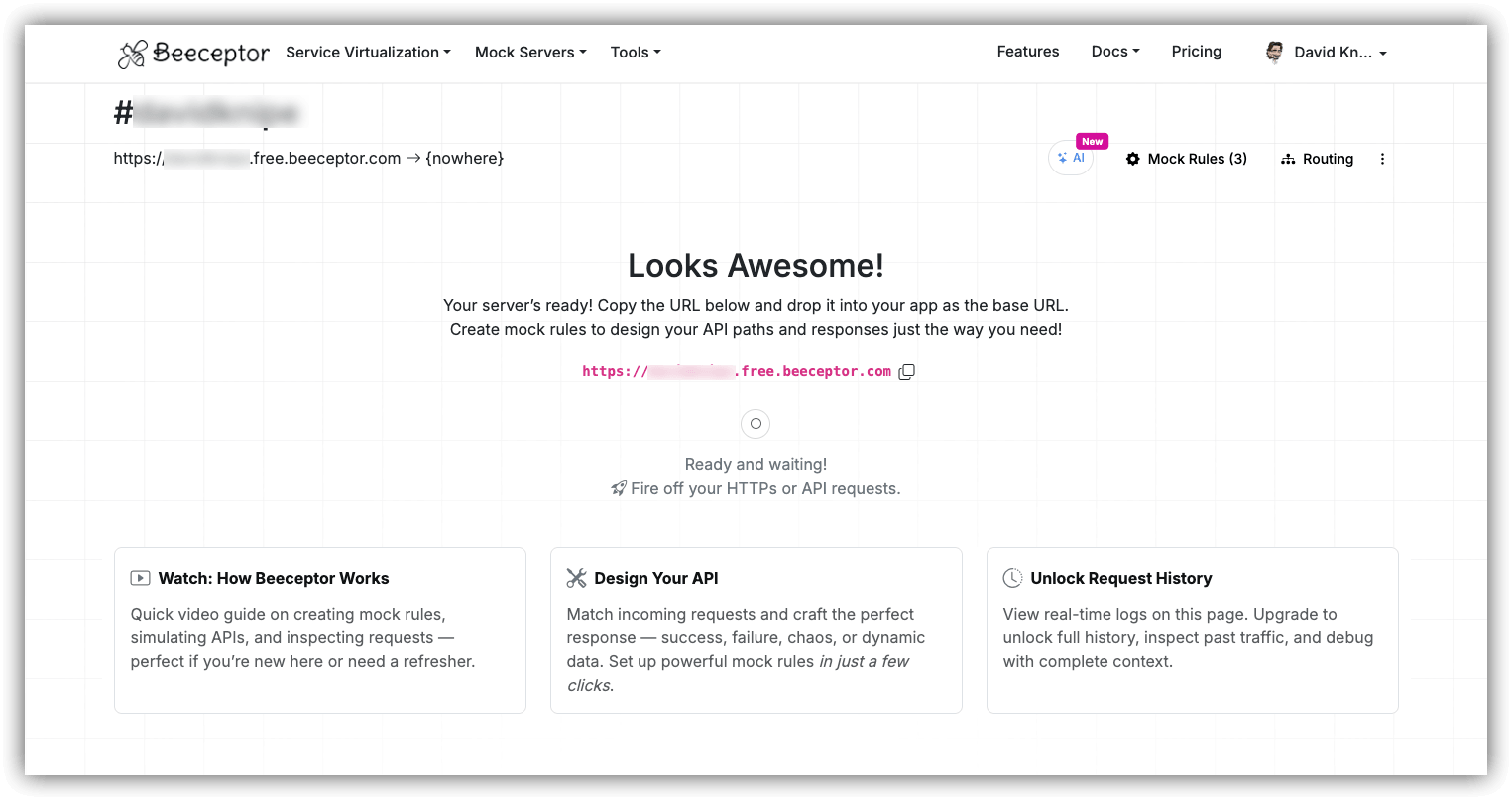
Step 1 - Create the endpoint
Sign up for a free Beeceptor account and create an endpoint. You'll get a URL like:
https://optimizely-cms-hook.free.beeceptor.comYou can append a path if you want the logs to read more clearly - for example /cms-hook. Whatever you use, it must be exactly the URL you paste into the CMS, because the handshake is issued against the exact URI you registered.
Step 2 - Add the mocking rule for OPTIONS
This is the step that does the actual work:
-
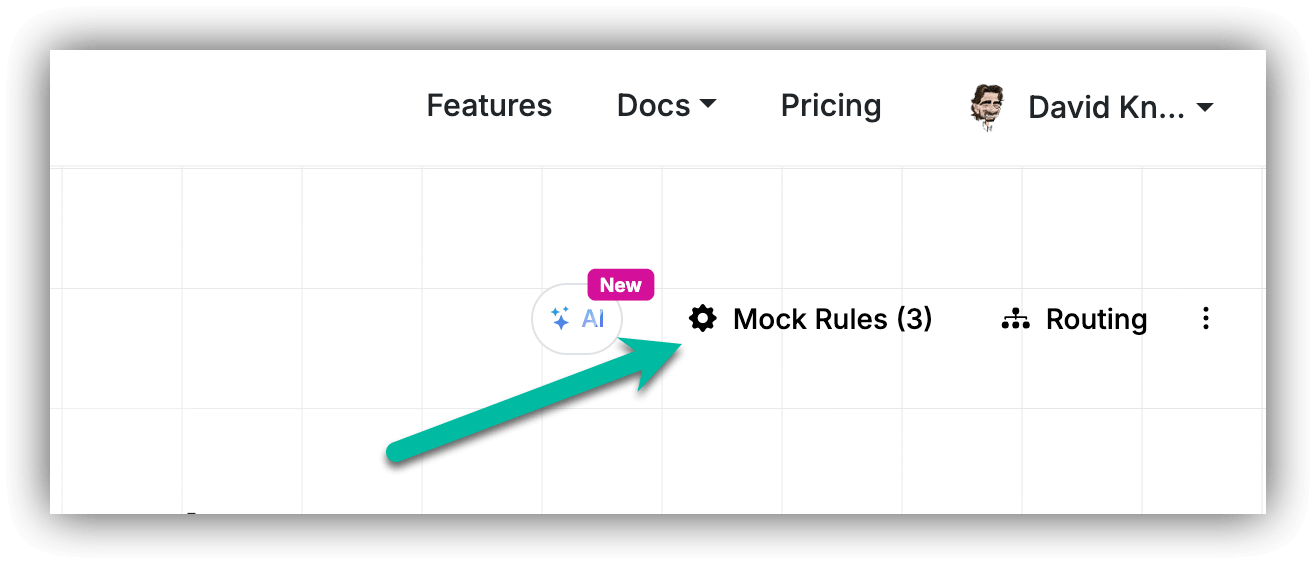
From your endpoint dashboard, open Mock Rules and create a rule.
-
Match on HTTP method
OPTIONSandPOST. For the path, either match your exact path (/cms-hook) or use starts with/to cover everything. -
Response status code:
200. -
Response headers - add our
WebHook-Allowed-Origin: *header: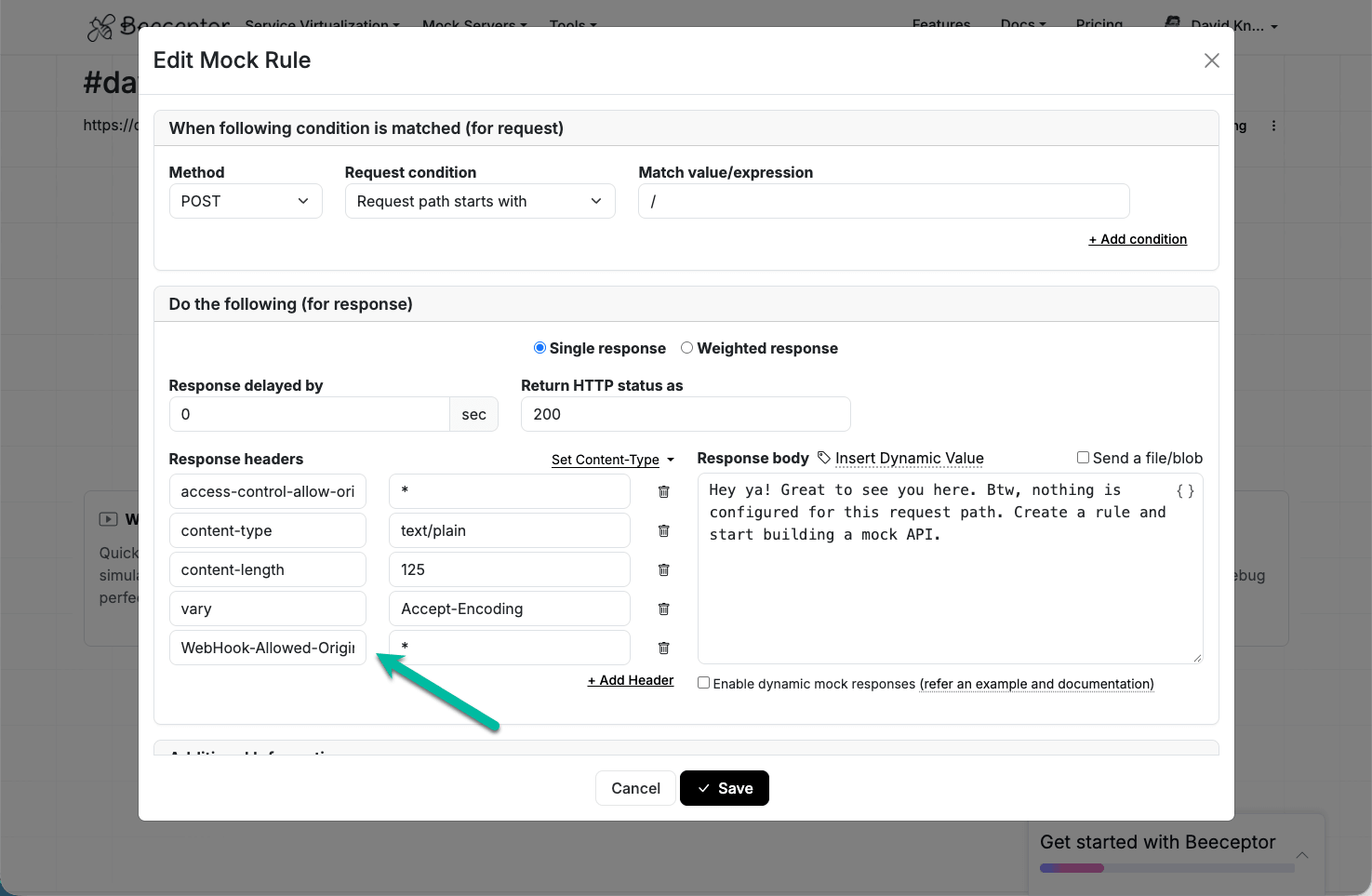
-
Leave the response body as default and save.
Step 3 - Verify the handshake yourself before touching the CMS
Don't round-trip through the CMS UI to test this. Reproduce the handshake with curl in two seconds:
curl -i -X OPTIONS https://optimizely-cms-hook.free.beeceptor.com/cms-hook \
  -H "WebHook-Request-Origin: cms.optimizely.com" \
  -H "WebHook-Request-Rate: 120"
You are looking for this in the response:
HTTP/1.1 200 OK
WebHook-Allowed-Origin: *
WebHook-Allowed-Rate: *
Allow: POST
If WebHook-Allowed-Origin is missing, the CMS will reject the URL. Fix it here, not in the CMS.
Step 4 - Register it in the CMS
Back in Optimizely SaaS CMS → Settings → Webhooks → Create Webhook:
-
Enter a Name and Description.
-
Paste the Beeceptor URL into Endpoint URL.
-
Optionally Add Authentication Token - the CMS sends it as
Authorization: Bearer <token>on every delivery. -
Pick your category and events. For my agentic workflow that's Content Version → Content Version Published (
contentVersion:preview1:published). -
Add Filters if you only care about a subset of content.
-
Click Create.
No error this time. The webhook is created in Pending, the handshake completes, and it flips to Active.
Step 5 - Publish something and read the payload
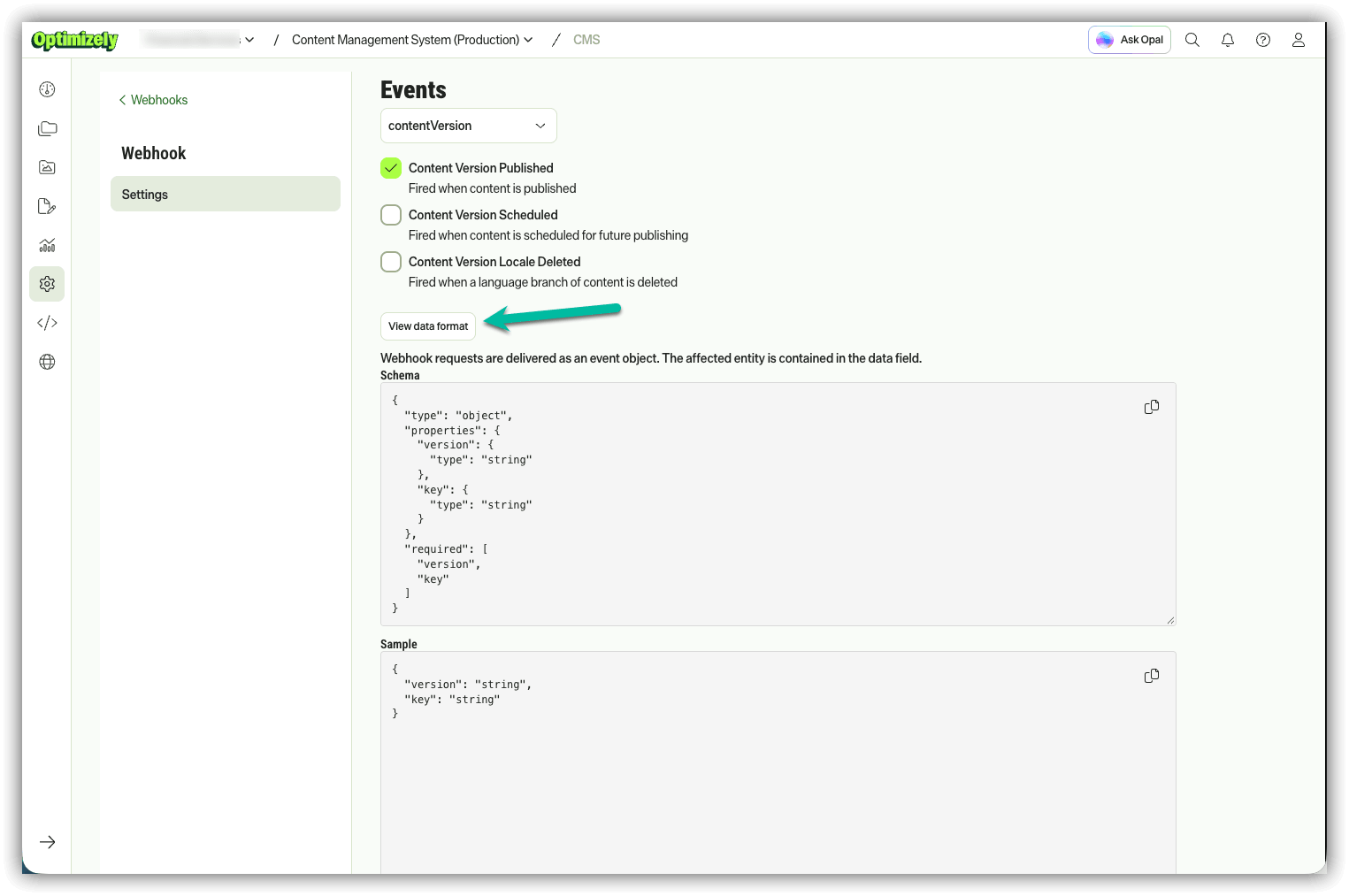
Publish any page, then watch the Beeceptor dashboard. You'll get the event envelope, with the affected entity nested in data:
{
  "type": "contentVersion:preview1:published",
  "subject": "/contentVersion/preview1/6946107a8ad6414f8f1786364dab1ec2/456",
  "data": {
    "key": "6946107a8ad6414f8f1786364dab1ec2",
    "version": "456"
  }
}
Note what you get and, more importantly, what you don't. The payload is an identifier, not the content. You get a key and a version - you do not get the page body, the content type, or the URL. Your consumer's first job is almost always a follow-up call to Optimizely Graph or the CMS REST API to hydrate that key into something useful. Better to learn that now, from a real payload, than three days into building the wrong thing.
You can also preview this structure without publishing anything by clicking View data format on the webhook in the CMS:
Don't want to depend on Beeceptor? Roll your own in 10 lines
The free Beeceptor tier has a daily request cap, which is fine for a spike and wrong for a soak test. Once you move past inspection, your real endpoint has to answer the handshake anyway - so here's the same behaviour in code.
Node / Express:
import express from "express";
const app = express();
app.use(express.json());

// The abuse-protection handshake
app.options("/cms-hook", (req, res) => {
  res.set({
    "WebHook-Allowed-Origin": req.get("WebHook-Request-Origin") ?? "*",
    "WebHook-Allowed-Rate": "*",
    Allow: "POST",
  }).status(200).end();
});

// The actual delivery
app.post("/cms-hook", (req, res) => {
  if (req.get("authorization") !== `Bearer ${process.env.CMS_WEBHOOK_TOKEN}`) {
    return res.sendStatus(401);
  }
  console.log(req.body.type, req.body.data);
  res.sendStatus(200); // ack fast, process async
});

app.listen(3000);
ASP.NET Core minimal API:
app.MapMethods("/cms-hook", new[] { "OPTIONS" }, (HttpContext ctx) =>
{
    var origin = ctx.Request.Headers["WebHook-Request-Origin"].FirstOrDefault() ?? "*";
    ctx.Response.Headers["WebHook-Allowed-Origin"] = origin;
    ctx.Response.Headers["WebHook-Allowed-Rate"]   = "*";
    ctx.Response.Headers["Allow"]                  = "POST";
    return Results.Ok();
});

app.MapPost("/cms-hook", async (HttpContext ctx, CmsEvent evt) =>
{
    var auth = ctx.Request.Headers.Authorization.ToString();
    if (auth != $"Bearer {Environment.GetEnvironmentVariable("CMS_WEBHOOK_TOKEN")}")
        return Results.Unauthorized();

    await _queue.EnqueueAsync(evt);   // ack fast, process async
    return Results.Ok();
});
Echoing WebHook-Request-Origin back rather than hard-coding * is the production-grade version - it means only Optimizely's origin is consented to, not the entire internet.
Gotchas worth knowing before you ship
-
Validation is bound to the URL. Change the endpoint URL on an existing webhook and you re-verify - and you'll be asked for the authentication token again. If you're promoting through environments, expect to redo the handshake in each one.
-
Deliveries are retried, so handle events idempotently. Optimizely manages the delivery infrastructure, the retries and the dead-letter queue, and none of it is configurable. Your endpoint will see the same event twice eventually. Processing it twice must produce the same result as processing it once - key off
subject, or offkey+version. -
Acknowledge fast, process later. Return
200immediately and hand the work to a queue. Don't run a 30-second Graph query inside the request. -
One category per webhook. You can't mix
content:*andcontentVersion:*events in a single webhook. Switching category in the UI warns you and drops the events - and the filters - from the previous category. -
Filters have limits. Maximum 20 values across all filters, 475 characters per value. Keys can't contain spaces, start or end with a period, or contain consecutive periods.
-
Always set an authentication token. Your endpoint is a publicly reachable URL that has just told the entire internet it accepts webhooks. Validate the bearer token on every
POST. -
*is a test-time convenience.WebHook-Allowed-Origin: *means "anyone may send me webhooks." That's fine for a Beeceptor endpoint that lives for an afternoon. It is not what you want on the endpoint that triggers your production publish pipeline.
FAQ
What does "The URL provided could not be validated. Please check the link and try again." mean in Optimizely SaaS CMS?
It means the CMS's validation handshake against your endpoint failed. Before saving a webhook, the CMS sends an OPTIONS request to the endpoint URL and expects a response containing the WebHook-Allowed-Origin header. If that header is absent, the CMS will not save the webhook - even if the URL is live and returns 200.
Is the error telling me my URL is unreachable or malformed?
Usually not. In practice the URL is almost always fine. The message is about the consent handshake, not about DNS, TLS or syntax. Test with curl -i -X OPTIONS <your-url> and check the response headers before you start debugging networking.
What header does Optimizely SaaS CMS need on the OPTIONS response?
WebHook-Allowed-Origin, set to * or to the exact origin supplied in the request's WebHook-Request-Origin header. Including WebHook-Allowed-Rate: * and Allow: POST is recommended.
Why doesn't webhook.site / Svix Play / RequestBin work?
Those tools are built around CORS. They answer OPTIONS with Access-Control-Allow-Origin: *, which is a different header for a different protocol. They don't emit WebHook-Allowed-Origin by default, so the CMS handshake fails. Use a tool that lets you set arbitrary response headers on OPTIONS - Beeceptor does.
Isn't Access-Control-Allow-Origin the same thing?
No. Access-Control-Allow-Origin is browser CORS. WebHook-Allowed-Origin is the CloudEvents HTTP webhook abuse-protection handshake. Similar names, unrelated mechanisms, and only the second one will get your webhook saved.
My webhook saved but is stuck in Pending - what now?
Pending means the endpoint hasn't confirmed the verification message. Re-run the OPTIONS handshake with curl and confirm the header is present in the response. Also check that your mocking rule matches the exact path you registered, and that it sits above any catch-all rules.
Do I need Beeceptor for production?
No. Beeceptor is for inspecting payloads during development. In production your own endpoint answers the OPTIONS handshake directly - see the Node and ASP.NET Core snippets above.
Wrapping up
The whole thing is a ten-minute problem that eats an afternoon, purely because the error message points at the URL when the actual issue is a missing response header on a request you didn't know was being made. Once you know the CMS is doing a CloudEvents-style consent handshake the fix is a single Beeceptor rule - or four lines in your own endpoint.
Now you can get on with the interesting part: reading the real payload, seeing that it hands you a key and a version rather than the content itself and building your downstream consumer around what's actually on the wire. In my case, that's an Optimizely Agent Platform agent that wakes up on publish and takes it from there.
Happy implementing.
References
-
Use webhooks to automate the content lifecycle - Optimizely CMS (SaaS)
-
Subscribe to events with webhooks - Optimizely CMS (SaaS) REST API
-
Send content events to Opal with webhooks - Optimizely CMS (SaaS)
-
CloudEvents - HTTP 1.1 Web Hooks for Event Delivery, §4 Abuse Protection